Small-Business Website: a Site That Brings Requests, Not Just Visits
A small business doesn’t need a website that only looks good. It needs one that turns a visit into a message, a call or a quote request. These are the parts we reuse across our sites to do that, from spam-proof forms to WhatsApp booking and local search markup.

The Challenge
A handyman, a car rental, a barbershop, a law firm: different trades, the same need. The site has to be found locally, explain the offer quickly and make it easy to get in touch.
We build these sites as fast static pages from parts that already work elsewhere. FixItFast, Gandia Renta Car and Obsidian each have their own case study; this one is about the toolkit they share.
Forms Without Spam and Without a Captcha
A captcha stops bots, but it also stops some people. Our forms use signals that a person never notices:
- The form has a hidden field, moved off-screen rather than hidden with
display: none, because smarter bots skip fields hidden that way. - It also has a minimum fill time, because a form sent less than three seconds after it appeared was not typed by a person.
- Submissions need a pause between them: the same browser can’t send a second request within a minute.
- A consent checkbox, which the law requires anyway.
A bot can skip the site’s scripts, so the platform that receives the form checks the hidden field and the timer again. If either fails, the bot gets the same “thank you” reply as a person, so it learns nothing. The platform also allows five requests an hour from one visitor and a hundred a day per business. It only forwards to email addresses the business has approved, so nobody can use the form to send mail elsewhere.
Every accepted request is emailed to the business and saved as a card in its CRM. If the CRM has a problem, the email still goes out.
Booking on WhatsApp, With the Message Already Written
Many small businesses already work from WhatsApp, so every button opens a chat with a first message in the visitor’s language, written for the page. On a car page at Gandia Renta Car it names the exact car and year and leaves blanks for the dates, ending with “My language: English”. On FixItFast, a bar fixed to the bottom of the screen keeps the button in reach on every page, and the message says the visitor wants a price for a job.
The visitor only has to press send, and the owner knows straight away what the request is about and which language to answer in.
A Price Calculator for Seasonal Rentals
A rental price depends on the season and on how long the customer keeps the car. At Gandia Renta Car, each car has prices for four seasons and eight rental lengths, from one day to a month or more. On the car page, the visitor drags a slider from 1 to 31 days and sees the daily rate and the total.
The site is built in advance, but the season depends on today’s date. So the season is worked out in the browser, and the price is right on the day the season changes, without a rebuild. The same calculation also produces the prices shown in the static HTML, so the calculator and the price table always agree.
Maps Without Google and Without Cookies
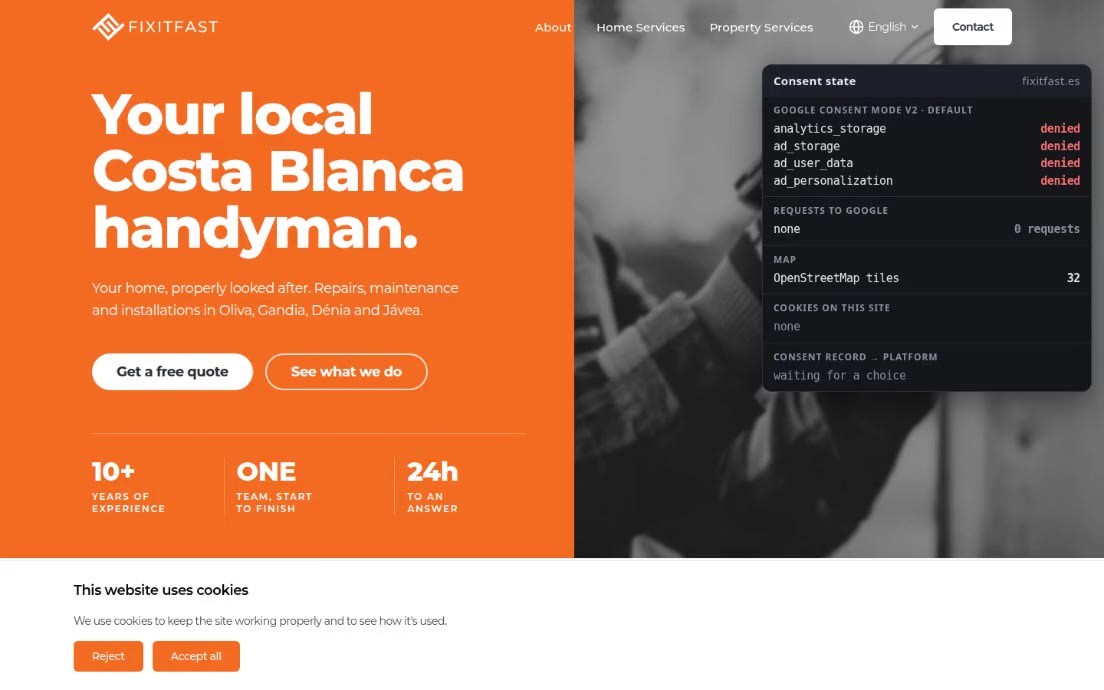
An embedded Google map sets Google’s cookies before the visitor has chosen anything in the cookie banner. We replace it with an OpenStreetMap map, which stores nothing on the visitor’s device. At Gandia Renta Car the map loads its tiles only when it scrolls into view, so a visitor who never reaches the contact section sends no request to the map servers at all.
For a business that travels to its clients, the map shows the service area. At FixItFast the areas are drawn from the official boundaries of the districts it covers, in two styles: the regular area and the area it serves only for larger jobs. The map promises no more than the text. The outlines are simplified once, when the data is prepared, from 165 KB of source detail down to a few kilobytes. They come from the same data as the base map, so they line up with the coastline and roads when the visitor zooms in.
For the hero section there is a lighter option: a ready-made SVG of the region with the business’s provinces highlighted and its towns pinned, so the browser loads an image, not a mapping library.
Read Correctly by Google and by AI Assistants
Each site describes the business in schema.org markup with the type that fits the trade, such as AutoRental for the car rental and HomeAndConstructionBusiness for the handyman. Every page refers to the business by the same identifier, so search engines see one company, not a copy per page. The facts in the markup come from the same files as the visible page, so the two can’t disagree. Star ratings are left out on purpose, because Google doesn’t allow a business to mark up its own rating. Pages with questions and answers get FAQ markup.
For AI assistants, each site publishes llms.txt and llms-full.txt: a short guide to the business and the full text of the site. At Gandia Renta Car they are built from the same data as the pages, and every page also has a Markdown copy. At FixItFast they are taken from the finished HTML at the end of every build. Either way, they can’t fall behind.
A Google Rating That Stays Fresh
A rating typed into a page goes out of date. At Obsidian the Google rating and the number of reviews are fetched from the Google Places API each time the site is built, so the figure on the page is as current as the last build. If Google doesn’t respond, the build uses a saved value instead of failing.
Moving Off WordPress Without Losing Links
An old site has inbound links and a history in Google. Before the move, we list every page the old WordPress site published, using its sitemap and its page list. Then we send each address to its new equivalent with a permanent 301 redirect. At FixItFast this covered the old pages, the same addresses without the trailing slash, the RSS feeds that every old page linked to, and a page with a Cyrillic address. Cloudflare doesn’t match Cyrillic addresses, so that one needed a pattern rule.
A Landing Page for Legal Services
The toolkit also works for a single page. Our landing page for an immigration lawyer is written in the language of its audience. It walks the reader through the procedure in six steps joined by a dashed line, from choosing the right route to receiving the new residence card. Each step ends with one key fact, such as how many routes exist or which rule applies. It then answers 14 common questions with references to the regulations in force, marked up as an FAQ for search engines. Every button opens WhatsApp with a message that states the reader’s situation and asks for the free first consultation. The footer says plainly that the page is not legal advice. Figures such as the number of approved cases are left blank until the firm supplies real ones.
Tech Stack
- Generator: Astro (static build) + @yatoday/astro-ui
- Interactive parts: Svelte 5 (calculator), Leaflet + OpenStreetMap (maps)
- Styling: Tailwind CSS 4
- Leads, CRM and consent records: Yatoday platform API
- Search and AI: schema.org JSON-LD, llms.txt and llms-full.txt generated at build
- Ratings: Google Places API, fetched at build time
- Hosting and redirects: Cloudflare Pages (_redirects)
- CI/CD: GitLab CI → Cloudflare Pages
Result
Each new small-business site starts from tested parts. Forms keep out bots without a captcha. Every page leads to a request or a WhatsApp chat that is ready to send. Prices and ratings stay current, maps show the area without setting cookies, and search engines and AI assistants get an accurate description of the business. When a client moves off WordPress, the old links keep working. The same parts are used on the sites we run on the Web.Yatoday subscription.