Ezeden Storefront: Search, Checkout and Repeat Purchases Built to Sell
A large technical catalogue loses buyers in three places: a search that finds nothing, a checkout that asks too much, and no reason to come back. The Ezeden storefront was built to close all three gaps, from the search box to the second order.

The Challenge
The Ezeden catalogue holds thousands of kitchen and furniture products with long technical names, sold in Ukrainian, Russian and English. The task we and the client set out to solve was a storefront where such a catalogue gets found and bought without extra steps.
Shoppers misspell those names, type with the wrong keyboard layout, or know a product only by the code on its box - the search had to find the product anyway. Checkout could not ask for anything it did not need. And many shoppers order once for a kitchen and come back months later for the same parts, so a repeat order had to be just as easy.
Search That Understands Mistakes
The search box answers while the shopper types. Suggestions appear after a short pause, grouped into products, categories and brands, and the search can be limited to one category. The browser’s voice input is offered where the browser supports it.
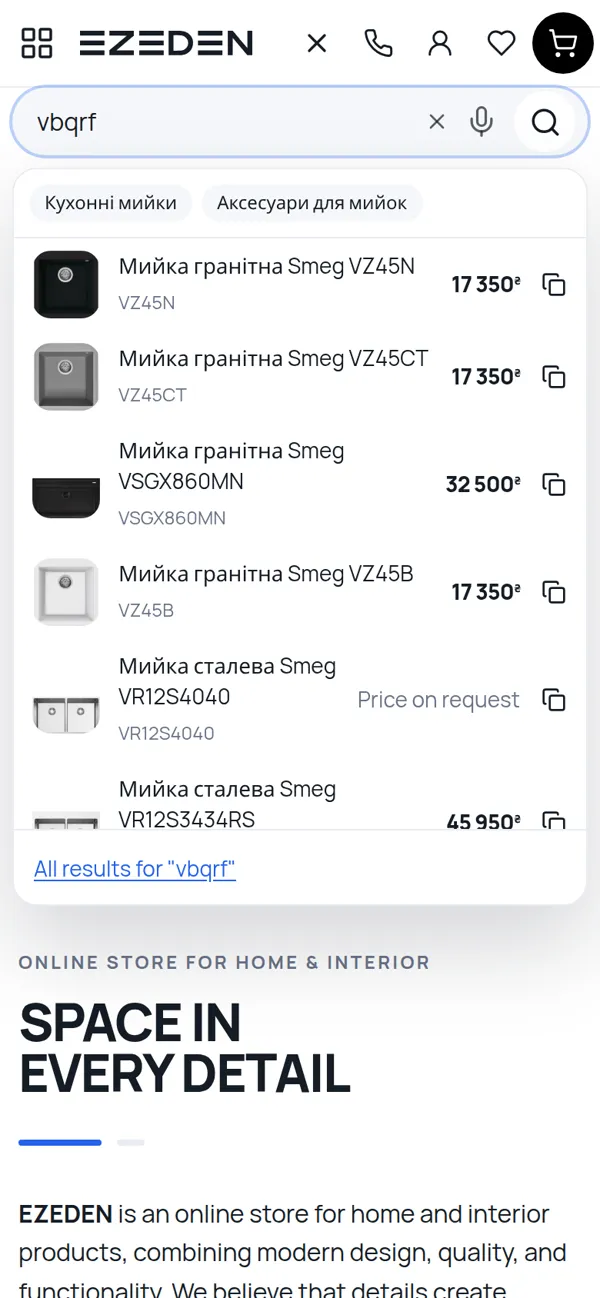
A misspelt name still finds the product, and so does a word typed with the keyboard set to the wrong language - “vbqrf” is read as the Ukrainian word for “sink”. A SKU, a barcode or a manufacturer’s article is matched against the codes alone, so a short code does not pull in every product that happens to start with the same letters.
Synonyms are set in the admin, where a manager ties the words customers actually use to the words the catalogue uses. A synonym works in all three languages and takes effect as soon as it is saved. Every term that returns no results lands in a log of empty searches in the admin, with a badge in the menu. The log re-checks itself whenever the catalogue or the synonyms change, so a term disappears from it within a minute or two of being fixed.
The search deliberately shows nothing rather than whatever came closest. An empty result goes to the log, where a person can fix it; a page of wrong products just loses the shopper.
Ready to Switch On: Plain Language and Photos
Two more ways of searching are built, tested and switched off by default, so the owner can turn them on once their accuracy has been checked on real queries.
The first is search in plain language: a shopper types “black 60 cm cooker hood under 10,000 hryvnias”. The words are turned into the filters the catalogue already has - category, colour, width converted to millimetres, a price ceiling - and the page is the ordinary listing with those filters, plus a row of chips showing how the query was read and a link to search by the words only. Simple queries such as a category and a brand are read by the catalogue itself without any AI. When AI is used, it may only choose from the categories, brands and values the shop really has; it cannot name a product or write text the shopper sees, and if it is slow or unavailable the shopper gets the ordinary search.
The second is search by a photo of the packaging: a shopper photographs the label on a box. AI reads the article and the barcode printed on it, and the catalogue looks up which product carries those codes. The model is never shown the catalogue, so it cannot invent a product, and a barcode with a wrong check digit is not searched for at all. The same lookup helps a manager find a product’s card from a box in the warehouse.
Checkout on One Page
Checkout is one page with four short blocks: contact details, delivery, payment, and a comment with a promo code. A signed-in customer picks a saved address instead of typing it.
Nova Poshta is built into checkout: the shopper picks a city and then a branch from the carrier’s own reference lists, or enters an address for courier delivery, and the delivery cost and the estimated delivery date are calculated on the spot. Payment is by card online through LiqPay, cash on delivery, or an invoice for companies, with the company’s saved legal details on the order. A shopper who does not want to fill in a form can place a quick order with just a phone number and a name; a manager calls back to confirm.
A failed online payment does not disappear: it goes to a queue in the admin, so a manager can contact the customer.
Reasons to Come Back
On the product page, a shopper can subscribe to price-drop and back-in-stock alerts and gets an email when the price falls below what it was, or when the product is back. Each further drop is announced again; a bounce back is not. A shopper who answers “Found it cheaper?” sends a link to the lower offer and the price there, and the request goes straight to a manager’s queue.
Shoppers leave reviews with a rating, up to five photos and video links, and ask questions that bring an email notice when the shop answers. Both are moderated in the admin, and the shop’s replies are shown under them.
A past order can be repeated from the account at today’s prices. Before anything reaches the cart, the shopper sees a report of what changed: a new price next to the old one, a product that is out of stock or no longer sold, a quantity reduced to what is left. The order can also be saved as a list, and a company can share it with its colleagues.
Returns are handled online too. Within the return period - 14 days by default - a customer chooses which items go back and how many, gives a reason, and says what should happen: a refund, a replacement or a repair. The request then moves through clear statuses in the account, and the shop works on it in the admin.
Found by Search Engines and AI Assistants
A category filtered by brand or characteristic is normally hidden from search engines, because thousands of such near-identical pages would compete with one another. Instead, a manager chooses the combinations worth finding - say, black kitchen taps of one brand - and turns each into a landing page with its own address, heading, introduction and SEO texts in every language. Landing pages are listed in the sitemap and linked from their category, and the same filters chosen by hand redirect to the landing page.
Product addresses are readable - type, brand, model and article - and the same in every language. Pages carry structured data: the product group and its variants, offers with shipping details and the return policy, ratings, breadcrumbs, the organisation and the site search.
For AI assistants, /llms.txt describes the shop - its terms, delivery and payment methods, contacts and links to the catalogue - and /llms-full.txt holds the full text of its pages and articles. Every product, page and article also has a clean markdown copy at its own address plus .md. All of it is read live from the catalogue, so a manager’s edit appears there at once.
Tech Stack
- Storefront: Laravel 13 + Inertia + React 19, server-side rendering
- Hub: Laravel 13 + Inertia + React 19 + Ant Design
- Search: Meilisearch with typo tolerance and synonyms
- Integrations: Nova Poshta API, LiqPay
- Data: MySQL 8.4, Redis 7
- Infrastructure: Docker Compose, GitLab CI/CD
Result
A shopper finds the product even with a typo, the wrong keyboard layout or only a code, orders it on one page with delivery to a nearby branch, and has reasons to return: alerts, a repeat order that says what changed, and returns without a phone call. Searches that fail become a to-do list instead of lost sales, and the store’s pages are ready for both search engines and AI assistants. Plain-language and photo search are built and wait for the owner’s decision to switch them on.