Telegram Shop: an AI Seller, a Mini App and Payment Without Leaving the Chat
Many shoppers would rather write to a shop in Telegram than fill in a form on a website, and a shop cannot keep someone answering every message at night. This platform puts an AI seller, a storefront and payment into the chat, while managers see everything live and can step in with one click.
The Challenge
For many shoppers Telegram is where they already talk to businesses. They ask “Do you have this in size M?” or “How much is delivery to my city?” and expect an answer in minutes. A shop selling through chat keeps hitting the same problems: night questions go unanswered, managers retype prices, orders get lost in the history, and the customer is sent to a website to pay.
The goal was a platform where the whole purchase happens inside Telegram, with an AI seller doing the routine work and people staying in control. Nothing in it depends on the product: the catalogue, filters and texts are set in the admin panel. Below we use a cosmetics shop as the example.
Who It Fits
Any shop that gets questions and orders through messengers: clothing and footwear, cosmetics, electronics and accessories, flowers and gifts, food and delivery, home goods, children’s goods, sports, pet supplies, car parts, and services with booking.
An AI Seller That Works Around the Clock
The bot answers questions about products, prices, stock and delivery at any hour. Before every reply it receives the live catalogue (only items in stock, with current prices), the shop’s delivery and payment terms and, during checkout, the state of the order. So “Is the vitamin C serum in stock?” is answered from the shop’s data, not from the model’s memory.
A customer can order by simply typing “Two serums and the night cream, please”. The bot confirms the items and asks for the name, city, delivery method and address, one step at a time. A returning customer is offered the details of their previous order to confirm.
The model never writes to the order itself. It passes what it understood in a hidden marker, and the server checks every field: items go through the same pipeline as a cart, with prices from the database; the phone must have enough digits; the postal code must have the right format; an unknown delivery method is ignored. When everything is filled in, the order is marked ready and the managers are notified.
The AI provider is chosen in the settings: Groq, Anthropic (Claude), OpenAI, OpenRouter, Together AI and other compatible services.
Voice Notes and Photos
Customers often send a voice note or a screenshot instead of text. The bot transcribes voice and video notes and describes photos, and the result is treated like a typed message: the AI answers it, managers read it in the panel. This runs on its own provider and key, so it keeps working even if the main chat model reads text only.
A Human Takes Over in One Click
A customer who writes “operator” or “manager” is handed to a person at once, and the model hands off by itself when a question is beyond it. In a closed Telegram group the bot posts new orders and escalated messages; a manager uses Reply on one of them, the answer reaches the customer from the bot, and the AI goes quiet in that chat. In the web panel the manager writes in the conversation or flips the AI switch. The AI returns only when a manager turns it back on.
AI on the Owner’s Personal Telegram
Some customers write to the owner’s personal account, not to the bot. Through Telegram Business the owner connects the bot to that account, and the AI answers those chats too, with the same catalogue and takeover rules. This needs Telegram Premium on the owner’s account. A new contact there first gets a button to press, so spam bots never reach the AI.
A Mini App Storefront
For those who prefer to browse, the bot opens a Telegram Mini App: search, category and price filters, sorting, product pages with photos and characteristics, and a cart. Filters are built from the categories set in the panel, so a new product range needs no code.
At checkout the Mini App sends the cart with Telegram’s signed launch data, and the server verifies the signature before accepting anything, then recalculates the prices itself. The cart appears in the chat as an order summary, and the AI continues with delivery.
A Website Catalogue That Hands the Cart to the Bot
The same storefront is published as a regular website on a multilingual base, so the shop can be found in search. A website visitor has no Telegram identity, so the cart is saved on the server for seven days and the visitor gets a link to the bot. One tap, and the cart becomes an order in the chat, through the same pipeline as the Mini App.
Payment Inside the Chat
Payment uses Telegram Payments with a connected payment provider. When an order is ready, a manager reviews it and sends the invoice from the panel with one button, and the customer pays without leaving Telegram. Before the charge the server checks that the order is still awaiting payment and that the amount and currency match. After payment the order is marked paid and the customer and managers are told; a repeated notification from Telegram cannot mark it paid twice.
Delivery to Pickup Points and Post Offices
When the customer picks CDEK, the bot sends the pickup points in their city with the delivery price and a “share location” button; a shared location returns the nearest points. Russian Post works the same way, and the bot also answers “which office has this postal code?” from the official postal code reference and map data. The office address is written by the server, not the model, so the bot cannot invent where a parcel goes.
A Realtime Admin Panel
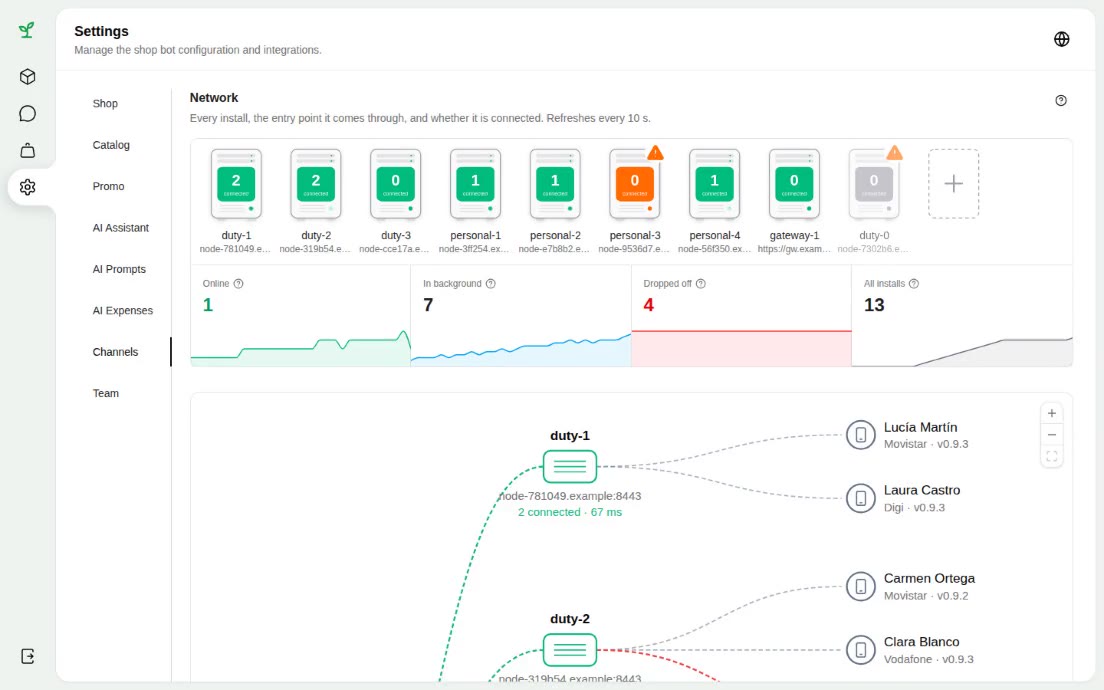
The panel updates live, without reloading:
- Orders: filters, delivery details, items, statuses, invoices and discount cards.
- Chats: customer, AI and manager messages, attachments and the AI switch.
- Catalogue: products, categories, characteristics, photos and visibility.
- Settings: shop terms, AI provider and prompts, promotions and the team.
Managers work with orders, chats and the catalogue; administrators also have the settings.
Promotions, Bonuses and Discount Cards
Promotions are set in the panel: dates, thresholds and gifts, for example a free item above a certain order total. The server calculates gifts and bonuses, and the bot tells the customer about them. Discount cards live in a registry and are applied by a manager, who checks the holder’s name against the recipient.
Follow-ups and Order Status
If a customer goes quiet mid-conversation, the bot returns after a delay set by the shop and picks up where they stopped. The number of follow-ups is limited, and they stop once the customer replies or a manager takes over. When an order is paid, shipped or cancelled, the customer gets a message in the chat, with the tracking number on shipping.
Spam Protection and AI Cost Control
Every AI reply costs money, so several layers sit in front of the model. A burst of messages gets one reply. Floods stop waking the AI. Each conversation and the whole shop have an hourly reply budget. A cheap classifier answers off-topic messages and prompt-injection attempts with a template instead of calling the main model, and it is skipped for customers already checking out.
The expenses dashboard shows spending by day and by model, the price of each model and the provider balances.
Tech Stack
- Backend and bot: Laravel 13, Nutgram (Telegram Bot API)
- Admin panel: React + Inertia, realtime over Laravel Reverb
- AI: Groq, Anthropic, OpenAI, OpenRouter, Together AI and compatible APIs
- Voice and photos: speech recognition and vision models
- Storefront: Astro (Telegram Mini App and website)
- Payments: Telegram Payments
- Delivery: CDEK API, Russian Post reference, OpenStreetMap
Result
The shop gets a seller that answers at any hour, takes orders written in plain chat and checks every order detail on the server. Customers browse, order and pay without leaving Telegram, from the chat, the Mini App or the website. Managers see every conversation and order live and step in with one click, and the cost of the AI stays under the owner’s control.