Yatoday Rental: Rent Collected, Matched and Receipted Without a Spreadsheet
A landlord with a dozen flats spends the first days of every month checking the bank app against a spreadsheet, writing receipts and forwarding water bills. Yatoday Rental does that work: it issues the charges, finds the transfers in the bank statement, reads the utility bills and leaves the owner only the confirmations.
The Challenge
Most private landlords in Spain run long-term rentals from three places: the bank app, a spreadsheet and WhatsApp. Every month they check which transfers came in, chase the tenants whose did not, write receipts by hand, forward the water and electricity bills, and once a year work out the rent increase from the INE index. With five flats this is a weekend. With twenty it is a part-time job, and mistakes end up in the tax return.
Yatoday Rental is our own service for these owners - long-term rentals, not holiday lets. The aim was simple: the service does the routine work, and the owner only confirms.
A Home Screen That Says What Needs Doing
The owner’s day starts on one screen: how much was charged this month, how much has come in, what is still to come and what is overdue. Below it is the list of debtors with the amount and the days overdue, a “Remind” button and a “Paid” button next to each. Payments that tenants have reported and that wait for the owner’s confirmation are listed separately, along with open repair requests, unread messages, the events of the next 30 days and the vacant flats with the days they have been empty.
Charges, Payments and Receipts
Every contract issues its charges by itself: the rent and any other monthly items, a few days before they are due. When the money arrives, the owner presses “Paid” - the full amount, today, by the contract’s usual method - or enters the details of a partial payment. A tenant can also press “I paid” with a photo of the transfer; the owner then confirms it or answers “It hasn’t arrived”.
Each confirmed payment produces a receipt with its own number from the owner’s series, generated as a PDF in the tenant’s language (or in two languages) and emailed to the tenant. Reminders go out on a schedule - three days before, on the day, three and seven days after - and the owner can send one by hand or as a ready WhatsApp message.
The “Payments” section shows the whole picture as a registry: properties down the side, months across the top, every cell coloured as paid, not yet due, partly paid, overdue or vacant. Clicking a cell opens that month’s charges with the “Paid” button. The registry and the charge list export to Excel and CSV.
The Bank Statement Matches Itself
The owner downloads the statement from the bank - Norma 43, camt.053, or the bank’s own Excel or CSV - and uploads it. A transaction uploaded twice is not added twice, so overlapping periods are fine.
For every incoming transfer the service looks for the contract and the open charges it pays: by the amount owed, by the sender’s name compared with the tenants’ names (ignoring case and accents), by an IBAN already confirmed for that tenant, and by the street named in the transfer description. Each suggestion shows the reasons and a confidence score out of 100. The owner confirms it, picks another charge, splits the transfer, or marks it “Not a rent payment”. “Confirm all suggested” does the whole month in one click, and every confirmed transfer sends the tenant a receipt, exactly as a manual “Paid” would.
The owner can also connect the bank account directly under PSD2 through Enable Banking. Transactions then arrive by themselves every six hours and go through the same matching.
Paying Online
Owners who want card payments connect their own Stripe account. The tenant presses “Pay online” in the cabinet or in the payment link from a reminder, and the money goes straight to the owner’s account. The service marks the charge as paid and issues the receipt when Stripe confirms the payment; refunds and disputes cancel the payment with the reason. A tenant can also sign a SEPA direct debit mandate once, after which the rent is collected on the due date, with a warning three days before.
Utility Bills Read by AI
When the bill is in the owner’s name and the contract says utilities are re-billed, the owner uploads the supplier’s PDF or a photo of it. An AI model (Anthropic Claude) reads the supplier, the bill number, the period, the total, the payment date and the contract number or CUPS. The service finds the property by that contract number or supply point and prepares a draft charge for the tenant with the bill attached. One bill for a whole building can be split between several flats, equally or by shares.
Nothing is charged until the owner checks the draft and presses “Issue”. If the model is unsure of a field, the field stays empty instead of being guessed.
Rent Indexation
A contract can be indexed by the rental index (IRAV), by the consumer price index (IPC) or by a fixed percentage. Thirty days before the date, the service calculates the new rent from the INE figure for the right month and shows the proposal on the contract and the home screen. For contracts signed from 26 May 2023 the increase is capped by the IRAV, and the proposal shows both figures. The owner confirms, lowers the amount or skips this year; the tenant is notified, unpaid charges move to the new amount and already paid months get a separate charge for the difference.
Deposits and Move-in Acts on a Phone
The deposit is tracked from receipt to lodging with the regional body - the deadline is counted in that region’s working days and holidays - and to its return after move-out.
On moving day the owner opens the move-in act on the phone and walks the flat room by room: photos, the condition of the room, each inventory item marked “Fine” or “Defect”, meter readings, and the keys handed over. Both sides sign on the screen. The signature records the time, IP address, device and a SHA-256 fingerprint of the act, after which the act cannot be changed. The PDF goes to the contract’s documents and to both sides by email. The move-out act compares the flat with the move-in act and works out what to deduct from the deposit.
The Tenant’s Cabinet and a Chat in Two Languages
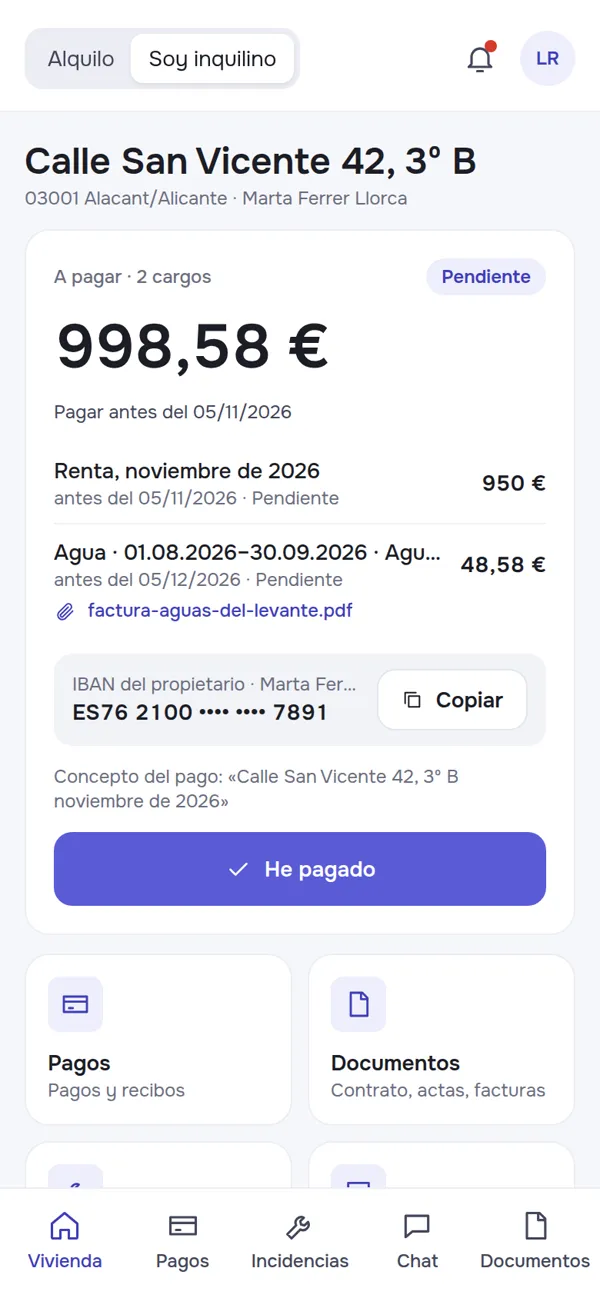
The tenant sees what to pay, can pay or report a payment, download receipts, read documents, report a problem with photos or video, and chat with the owner. The chat works in real time with files, read marks, quick replies and an out-of-hours auto-reply with emergency phone numbers.
Each side writes in their own language and reads the other in theirs: a Spanish tenant’s message appears to an English-speaking owner in English, with the original one tap away.
From a Listing Link to a Contract
For a vacant flat the owner fills in a short wizard and gets a page to send to anyone who asks. Candidates answer a simple form: who will live there, move-in date, work, income, guarantor, pets. The owner sees each candidate’s income as a multiple of the rent, rates them with stars, compares several side by side, writes notes, chats with them and asks for documents. Choosing a candidate creates the tenant and a draft contract; the data of the others is deleted 30 days later.
Tech Stack
- Backend: Laravel 13 (PHP 8.5), MySQL 8.4, Redis + Horizon queues
- Frontend: Inertia + React 19 + TypeScript, Tailwind CSS, Ant Design; installable PWA
- Real-time: Laravel Reverb (chat, notifications), Web Push
- Search: Meilisearch
- PDF: Gotenberg (receipts, acts, reports)
- AI: Anthropic Claude (bill reading, message translation)
- Payments: Stripe Connect (cards, SEPA direct debit), Laravel Cashier (owner plans)
- Banking: Norma 43 / camt.053 / XLSX import, PSD2 via Enable Banking
- Infrastructure: k3s on Hetzner, ArgoCD, GitLab CI, GlitchTip
Result
The month-start routine becomes a few confirmations: charges issue themselves, the bank statement pairs transfers with charges, receipts go out on their own, and utility bills turn into draft charges. Indexation, deposits and handovers follow the contract instead of the owner’s memory, and the tenant has one place for payments, documents and messages. Load tests on 300 owners and 5,000 properties keep every page under 300 ms at the 95th percentile.
Status: the service is built and has not launched yet; card payments, direct debits and bank connections have so far been tested against simulated providers.